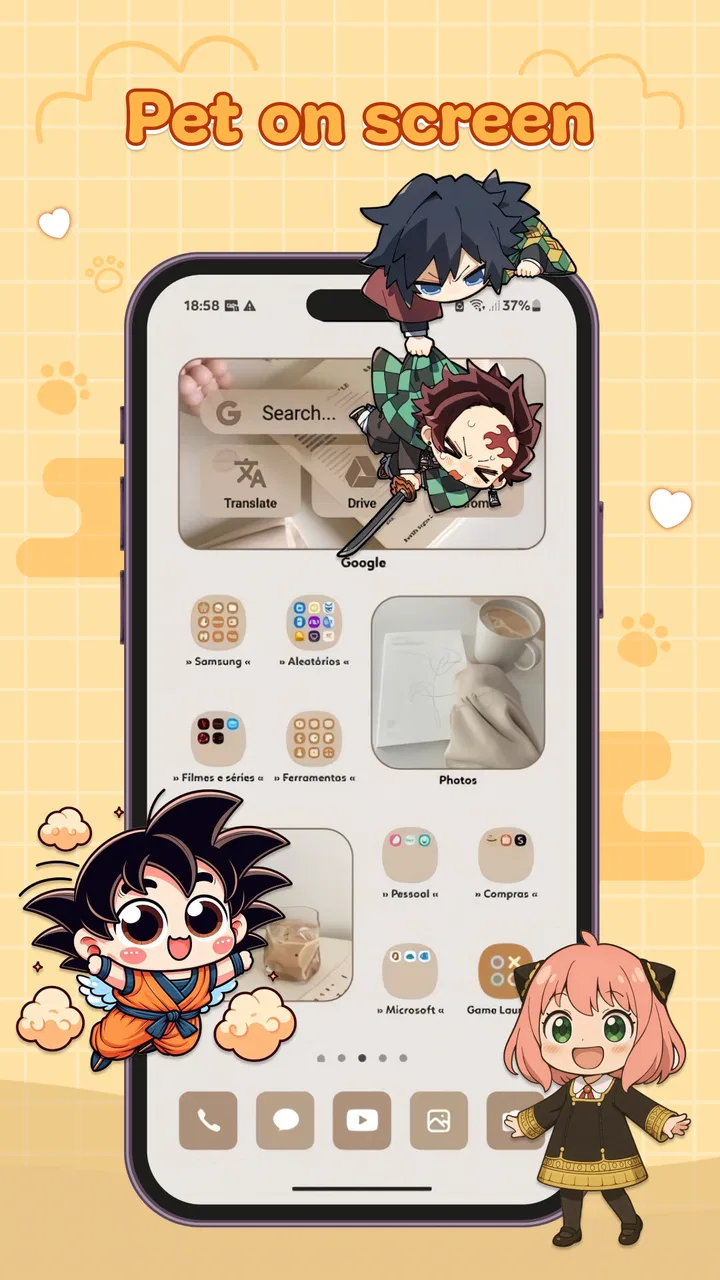
Anime Shimeji, Pet On Screen
- 0.0
- Rating
- 50.00K
- Installs
- Free
- Price

 Analysis by App-foxy
I like personalization apps that add character without asking me to rebuild my entire phone. Anime Shimeji, Pet On Screen takes that smaller, more playful approach: it places an anime-style companion over the screen so the character can move around while I use other apps. That makes it feel less like a traditional wallpaper and more like a tiny desktop pet adapted for a mobile device.
My first impression is that the appeal depends on whether you enjoy a bit of visual activity around your normal phone routine. If you want a quiet home screen, this may feel distracting. If you like anime-inspired decoration and enjoy seeing a character wander across the display, it offers a simple way to make an otherwise ordinary phone feel more personal.
The app is free, aimed at Everyone, and comes from EVER PROFIT INDUSTRIAL LIMITED. It belongs to the personalization app category rather than being a game with levels or a social platform. That distinction matters: I would install it for atmosphere and amusement, not for a deep progression system or a long play session.
You May Also Like

 Blood Strike: 2.5 Anniversary
Blood Strike’s Loadouts Turn Every Drop Into a Tactical Gamble
A close look at Blood Strike’s custom loadouts: how fast access to signature weapons reshapes its battle royale rhythm, rewards preparation, and narrows the gap between fights.

 Pandora - Music & Podcasts
Pandora’s Music Is Easy to Start, but Harder to Recover
Pandora’s strength is its low-effort path from a seed to a station. Its weak spot is how much confidence it asks you to place in connection, setup, and quiet recovery.

 8 Ball Pool
8 Ball Pool Is Built on Rivalries, Rematches, and Routine
A close look at the rivalries, rematches, shared routines, and unanswered safety questions that turn a quick pool match into a persistent mobile community.

 Samsung Music
Samsung Music’s Quiet Strength Is Playing What You Already Own
Its reach comes less from spectacle than from dependable access to a personal library. That simplicity is both the app’s strongest retention engine and its ceiling.

 AccuWeather: Weather Radar
AccuWeather Review: A Quick, Clear Forecast for Everyday Decisions
For everyday plans, the best forecast is the one you can understand quickly. AccuWeather makes rain timing, radar, and local conditions easy to act on, with a few trade-offs.

 Hill Climb Racing
Why Hill Climb Racing Still Turns Crashes Into One More Run
A tiny car, a bumpy hill and one more upgrade: Hill Climb Racing keeps resurfacing because its simple chaos makes every near-miss feel personal.
More From Our News Desk



How the on-screen pet fits into everyday phone use
I find the on-screen pet works best when I treat it as a layer I can bring in and out of my routine, rather than a decoration that has to stay active all day. In this section, I’m looking at how its place on the display affects ordinary tasks and how a quick check before settling on a setup can make the experience feel more intentional.
A small companion rather than a full game
The central idea is straightforward. I customize an anime shimeji pet and let it appear on top of the phone screen, where it can move while I continue doing other things. The character is therefore part of the phone’s visual environment. I do not need to open a separate game window every time I want to see it, which is the main difference from ordinary anime games and character apps.
That design works best in short, casual moments. I can imagine choosing a character before settling in to listen to music, browse messages, or wait for a download. The pet becomes background entertainment rather than the task itself. This is also why the app feels closer to a live decoration than to a conventional interactive game.
The trade-off is that an overlay can compete with whatever I am trying to read. A moving character may cross a text field, sit near a button, or simply pull my attention away from a video. I would treat the pet as a decorative layer and turn it off before anything requiring concentration, such as filling out a form, following navigation directions, or handling work messages.
Where connectivity enters the experience
Connectivity is most noticeable around the moments when the app needs to load or refresh content. With a stable connection, those transitions are less frustrating because the app can move promptly from selection and customization into the on-screen experience. On a slow network, I would expect the waiting itself to become more visible, especially when I am trying the app for the first time or changing what appears on screen.
I would not judge the app solely by how quickly the pet appears during one launch. Network conditions, background activity, and the phone’s own workload can all affect that first impression. My practical advice is to set it up while connected to reliable Wi-Fi, then test the overlay during the kind of mobile use you actually care about. That gives a more useful impression than configuring it in a hurry on a weak signal.
The network also shapes how convenient the app feels when I am away from home. A decorative companion should be quick to start, so any delay feels more noticeable than it would in a large game with a substantial loading screen. If I am on a limited mobile plan, I would avoid repeatedly reopening the app just to experiment. I would make the main choices in one session and leave the pet alone until I have a reason to adjust it.
Using it on a phone, not just admiring it
On a small display, the position of the pet matters more than I initially expected. A character near the lower edge may overlap navigation controls, while one near the top can interfere with notifications or a search bar. I would watch the pet for a few minutes after enabling it and notice where it tends to travel before deciding whether it is comfortable for daily use.
This is one of the app’s less obvious practical considerations. The most attractive position is not always the most usable one. I prefer leaving clear space around controls and text, even if that means the character spends more time near an empty side of the screen. A little restraint makes the effect feel intentional instead of messy.
It also helps to match the pet to the activity. A playful character can make a short break more enjoyable, but it is not ideal during reading or typing. I would use the app while relaxing, waiting, or showing the phone to a friend, then disable the visual layer for banking, work, study, or any situation where a stray tap could matter.
What happens when the connection or overlay misbehaves
The most important recovery habit is not to keep tapping blindly. If the pet does not appear after a network change, I would first wait briefly, check whether the connection is stable, and then close and reopen the app. Repeatedly switching settings while the phone is struggling to connect can make it harder to tell whether the problem is the network or the app state.
If the character disappears while I am using another app, I would return to Anime Shimeji and check the selected setup before assuming the customization was lost. A simple restart is often a better first step than changing several options at once. I would also remove the overlay before restarting the phone, then enable it again afterward, because that gives me a clean sequence to test.
There is a separate kind of failure: the app may work correctly but still feel wrong in a particular context. If the pet blocks a control or distracts me, that is not necessarily a technical fault. The sensible recovery is to disable the on-screen companion during that task. This is a personalization tool, so I should be able to treat it as optional decoration rather than something that must remain visible all day.
For anyone wondering whether the app suits an older device, the minimum operating-system requirement is Android 7.0. That makes compatibility relatively approachable for people who are not using the newest phone, although the actual smoothness can still depend on the device, its available memory, and what else is running. I would keep expectations realistic on an older handset: a moving overlay is more demanding than a static background, even when the app itself is lightweight in concept.
Being careful with mobile data and attention
Because this is a visual personalization app, I would use it selectively rather than leaving it active without thinking. The safest data-conscious routine is to configure it on Wi-Fi, avoid unnecessary repeated refreshes, and switch it off when I know I will be away from a reliable connection for a long time. That keeps the experience deliberate and prevents a decorative feature from becoming an unnoticed part of my mobile routine.
I would also pay attention to battery behavior. A character that moves over other screens is more active than a still wallpaper, so I would not leave it running during a long trip when battery life matters. If I am travelling, using a navigation app, or waiting for an important call, the pet is the first personalization feature I would pause. The visual benefit is pleasant, but it is not worth compromising the phone’s primary jobs.
Another useful habit is to avoid testing every customization while using cellular data. I would pick a small set of favorites, observe how they look against light and dark interfaces, and keep the option that remains readable without covering important areas. This is a better workflow than constantly changing the pet whenever I become bored, especially when connectivity is limited.
Privacy-conscious users should approach any app that appears over other applications thoughtfully. I would review the phone’s own permission prompts and system controls before enabling anything, and I would disable the feature if I felt uncomfortable with how it behaved. I am not treating the overlay as harmless simply because it is cute; anything that sits above other apps deserves the same practical caution as any other screen-level tool.
Customization that works best with a clear purpose
The word “customize” is important here, but I would not confuse customization with unlimited complexity. The strongest use of the app is choosing a companion that matches a mood, a favorite anime style, or the look I want for a particular period. It is a small change, yet it can make the phone feel more like mine without replacing the launcher or redesigning every icon.
One of my favorite ways to use this kind of app is as a conversation starter. If I am with friends who enjoy anime, a little character moving across the display is more memorable than another static wallpaper. For a younger user, it can make the phone feel more playful. For an adult user, it works as a deliberately silly accent during breaks rather than something that needs to look polished all the time.
There is a useful distinction between personal enjoyment and public presentation. I might leave the pet enabled when relaxing at home but turn it off before sharing my screen or handing the phone to someone unfamiliar. That lets me keep the personalization without forcing it into every situation. The app is at its best when I control when the character is visible.
How it compares with familiar alternatives
Compared with a normal anime wallpaper, Anime Shimeji offers more movement and presence. A wallpaper stays behind the icons and rarely interrupts what I am doing. The shimeji approach feels livelier, but that liveliness brings the possibility of distraction and overlap. I would choose the wallpaper alternative for a clean, dependable appearance and this app for a more playful screen.
Compared with a full anime game, the app is much lighter in purpose. I am not opening it for combat, story missions, or a structured challenge. That makes it easier to fit into short breaks, but it also means users looking for depth will probably move on quickly. A game is the better choice when I want active goals; this is better when I want a companion in the background.
Compared with a launcher or icon pack, it changes less of the phone’s identity. I do not have to commit to a complete visual redesign to get an anime-inspired touch. The downside is that it cannot provide the same consistent control over layout, icons, and navigation. For someone who wants a carefully organized home screen, a launcher is the more coherent option.
Compared with a static widget, the pet is more expressive but less informative. A widget can show weather, tasks, or appointments at a glance. This app is not there to improve productivity; its value is emotional and visual. I would not install it expecting practical information. I would install it because a moving character makes ordinary phone use feel a little less sterile.
Who will enjoy it, and who should skip it
I think it is a good match for anime fans who want a low-commitment decoration, people who enjoy virtual pets, and anyone who likes customizing a phone in ways that are visible during everyday use. It can also suit someone looking for a small distraction during breaks, provided that person is comfortable managing an overlay and turning it off when necessary.
I would skip it if I prefer a distraction-free interface, rely heavily on a limited mobile connection, or need every pixel available for reading and typing. It is also not the right substitute for a game with meaningful interaction. The app’s charm comes from presence and movement, not from a large system of goals.
Families may appreciate the Everyone age rating, but I would still help younger users understand when an on-screen pet should be disabled. A child may enjoy seeing it everywhere, while a parent may prefer it hidden during schoolwork or important calls. The rating makes the app broadly approachable, but sensible screen habits still matter.
Version, availability, and the practical setup
Anime Shimeji is free to download, which makes experimenting with it fairly low-risk. It has reached over fifty thousand installs, enough to show that the concept has found an audience while still feeling more niche than the biggest personalization tools. The developer is EVER PROFIT INDUSTRIAL LIMITED, and the current version is 0.0.6, so I would approach it as a relatively early app and keep expectations flexible when judging polish.
The app was released on May 31, 2026. On a compatible Android phone, I would begin by setting it up on a stable connection, choosing a character, and observing how the pet behaves across the home screen and one or two frequently used apps. That short test reveals more than simply seeing a preview: it tells me whether the movement is charming or distracting on my particular display.
I would then create a simple personal routine. Keep it enabled for leisure, disable it for work or navigation, and avoid changing settings repeatedly when the network is weak. If the pet vanishes, return to the app and restart the setup calmly instead of assuming the phone is broken. These small habits turn a novelty into a more manageable personalization feature.
My connectivity verdict
Connectivity does not define the app’s charm, but it affects how smoothly that charm arrives. A reliable connection makes setup and changes feel less interrupted, while poor service can make a simple decorative experience feel unnecessarily slow. I would therefore configure it when connected, use it selectively on mobile data, and avoid depending on it during situations where the phone must remain predictable.
My overall view is positive but specific. Anime Shimeji, Pet On Screen is worth trying if I want an anime companion that lives on the display rather than another static background. Its best use is casual, visible, and temporary: a little character during downtime, not a permanent layer over every task. The key is treating the pet as an optional mood setter, not as part of the phone’s essential interface.
For me, that balance is what makes the app appealing. It adds personality without demanding a full game session or a complete launcher makeover. At the same time, I would not recommend leaving it active indiscriminately, especially on a limited connection, an older phone, or a busy workday. If those trade-offs sound reasonable, Anime Shimeji is a charming personalization experiment; if you want efficiency and visual calm first, a wallpaper or icon pack will likely serve you better.
FAQs for Anime Shimeji, Pet On Screen
01What is Anime Shimeji, Pet On Screen?
Anime Shimeji, Pet On Screen is a customization app that places animated anime-style characters over your phone’s home screen and other apps. These small virtual pets can walk, climb, jump, and interact with the edges of the display while you use your device. It is designed mainly for entertainment and personalization rather than productivity, giving your screen a lively anime-inspired appearance.
02How does Anime Shimeji, Pet On Screen work on Android or iOS?
After installing the app, you generally choose a character, grant the requested permissions, and activate the on-screen pet feature. On compatible Android devices, this may require permission to display over other apps so the character can appear above your normal interface. Availability and behavior can differ on iOS because Apple limits persistent overlays, so users should check the app’s current store description and supported features before downloading.
03Does Anime Shimeji, Pet On Screen require special permissions?
The app may request permissions related to displaying content over other applications, notifications, or device settings, depending on the platform and version installed. These permissions allow the animated character to remain visible while you browse or use other apps. Before approving anything, review the explanations carefully and disable access that does not seem necessary. Features may stop working if required permissions are removed.
04Can Anime Shimeji, Pet On Screen affect battery life or phone performance?
Because the app keeps animated characters active on the screen, it can use additional battery, memory, and processing resources compared with a static wallpaper. On newer phones, the impact is usually manageable, but older or less powerful devices may experience slower performance or faster battery drain. If this happens, reduce the number of pets, lower animation activity, or turn the overlay off when it is not needed.
05Is Anime Shimeji, Pet On Screen free to download and safe for children?
Anime Shimeji, Pet On Screen may be available as a free download, although some characters, customization options, or features can require advertisements or in-app purchases. Parents should review the store rating, privacy information, advertising behavior, and available character content before allowing children to use it. Since the app can appear over other applications, supervising permissions and preventing accidental purchases is also recommended.
Pros
- Cute anime characters add personality to your home screen.
- Runs quietly in the background without interrupting most tasks.
- Offers several character styles to suit different anime tastes.
- Simple controls make character placement easy to adjust.
- Can make idle screen time feel more entertaining and lively.
Cons
- May consume extra battery while animated pets remain active.
- Some characters or features may require in-app purchases.
- On-screen overlays can occasionally cover buttons or text.
- Animations may feel repetitive after extended use.
- Requires overlay permissions that some users may prefer to avoid.

Anime Shimeji, Pet On Screen
Gallery